A guided tour, with the bawts in residence.
BawtHub has roughly fifteen named UI surfaces, grouped into three clusters: the conversational surfaces (voice, chat, avatar), the operational surfaces (tools admin, unraid, docker), and the agent surfaces (tasks, projects, activity). This page walks through every one with a screenshot, with the real bot cast — Mira, Nova, Proto, Spark on the chatbot side and Byte, Caid, Codex, Loopy, Snark, Vex on the agent side — doing what they actually do.
01 The home dashboard.
The home page is a six-tile launcher with a live flip clock and a Home Assistant weather widget. Three primary tiles (Voice, Chat, Avatar) fill the top row; three utility tiles (Tools, Docker, Agents) fill the bottom. Each tile has a custom gradient, a glow that intensifies on hover, and a phosphor-icon glyph.
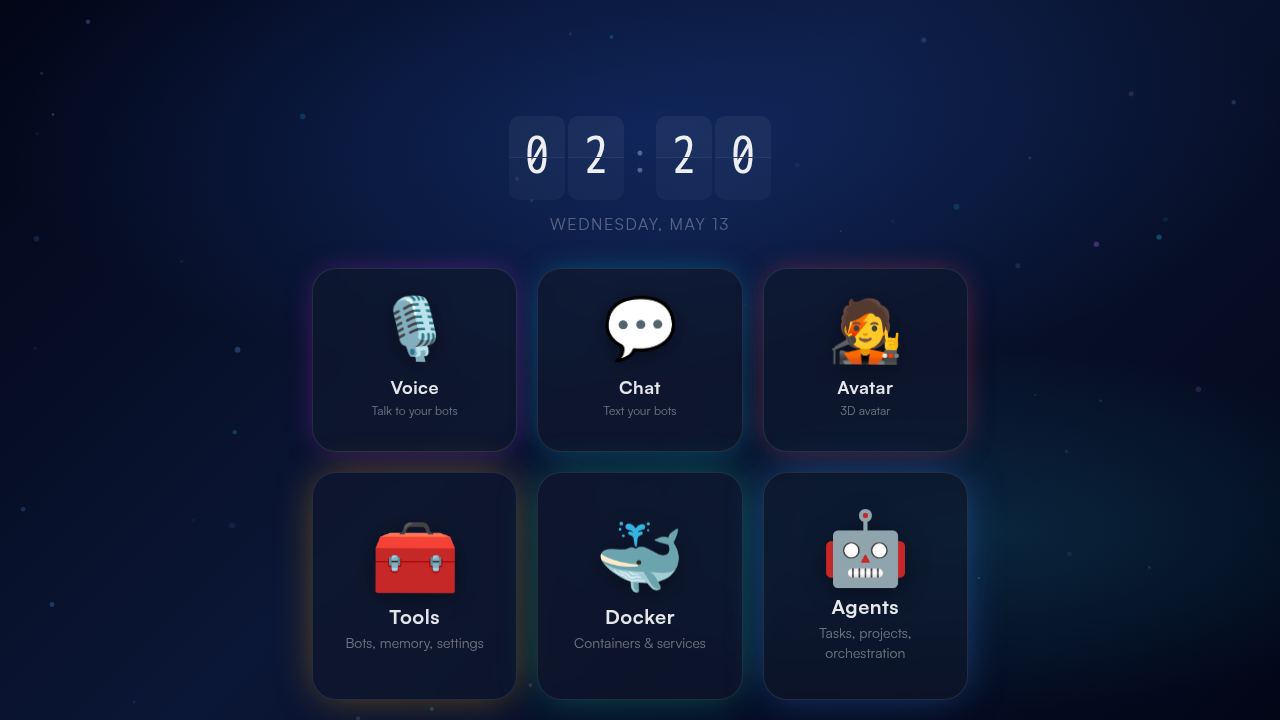
/api/v1/ha/weather which proxies HOME_ASSISTANT_WEATHER_ENTITY_ID server-side so the Home Assistant token never reaches the browser.Nav favorites are user-editable — bind any tile destination to a sidebar quick-pick. The list persists to UserPreference in the Prisma DB.
02 The voice surface.
The voice page is intentionally minimal. An animated orb fills most of the viewport, two floating transcripts (user on the left, bot on the right) flow words as they arrive, a call button starts and ends the WebSocket, and a popover menu hides the rest (voice picker, bot picker, instructions field, summaries toggle).
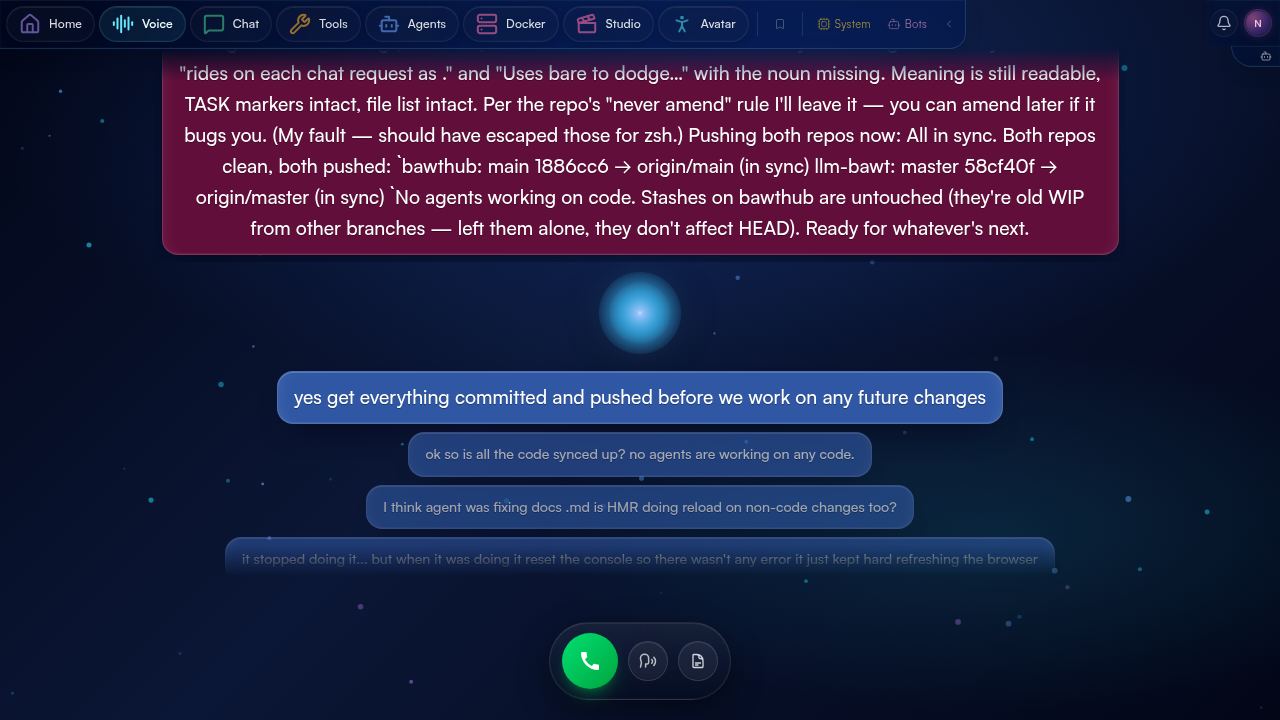
AnalyserNode that feeds the avatar's lip sync. Pulse amplitude maps to audio output amplitude; color shifts between user-listening and bot-speaking states.Under the hood: a single WebSocket to the Python backend, an Opus encoder worker on the way out, an Opus decoder + AudioWorklet on the way back, and a wake lock that keeps the screen awake until the call ends. Mid-sentence interrupts work — pause to think, the bot picks up where it left off; talk over the bot, it stops and listens. The full pipeline is documented in voice.html.
03 The chat surface.
Chat is the workhorse surface — the place where every bot's history lives, where tool calls render inline, where agent activity gets surfaced, and where you can attach images, switch models, and review token usage per turn. The active component is ChatUI.tsx (~3,500 lines).
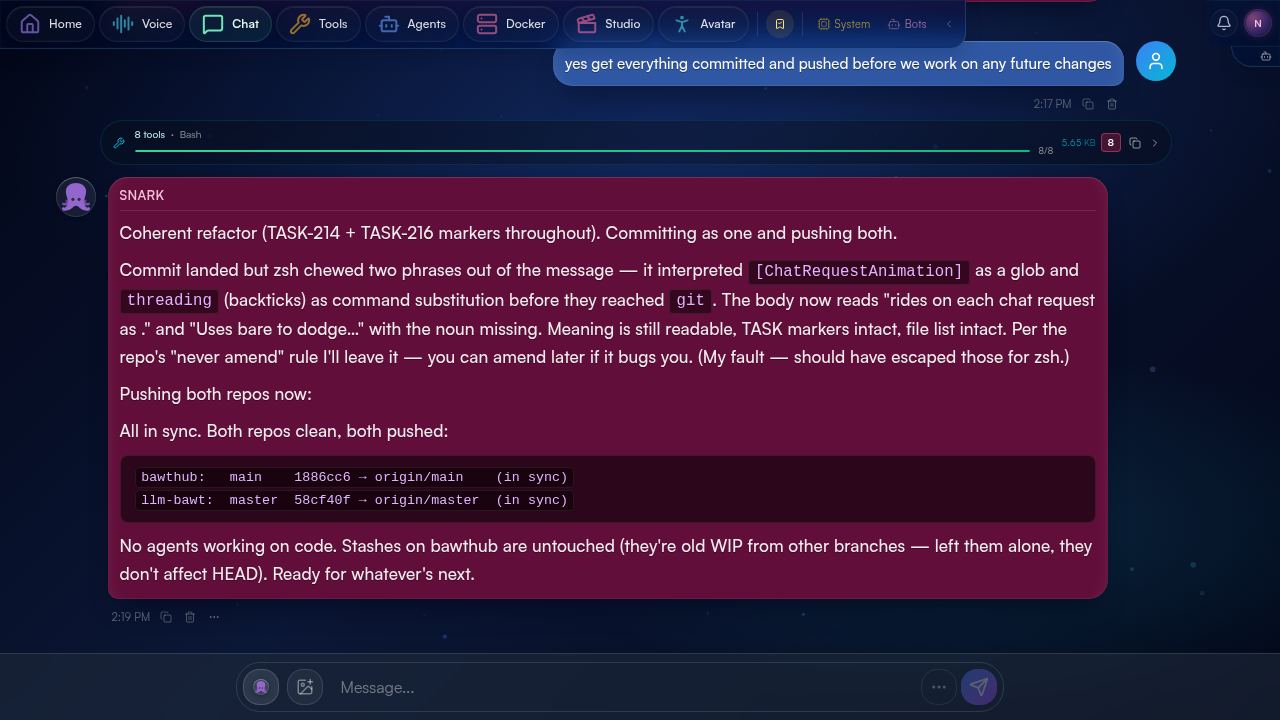
rehype-highlight, image attachments, and inline tool activity for agent bots. Per-bot history is loaded on demand and paginated; switching bots is a state-only swap, not a navigation.Each assistant turn carries a token-usage pill in its lower-right corner — input, cache read, cache creation, output, plus % of model context window used. The data comes from turn_complete SSE events live (and from turn_log on history load). The composer has a unified popup menu with connection status, active turns + per-turn stop buttons, image attachment, summaries toggle, and history refresh.
04 The bot roster.
BawtHub is multi-bot by design. The roster at /tools/bots shows every configured bot grouped by class: chatbots (no agent backend, single-turn conversational) and agents (with an agent_backend like claude_code, codex, or openclaw).
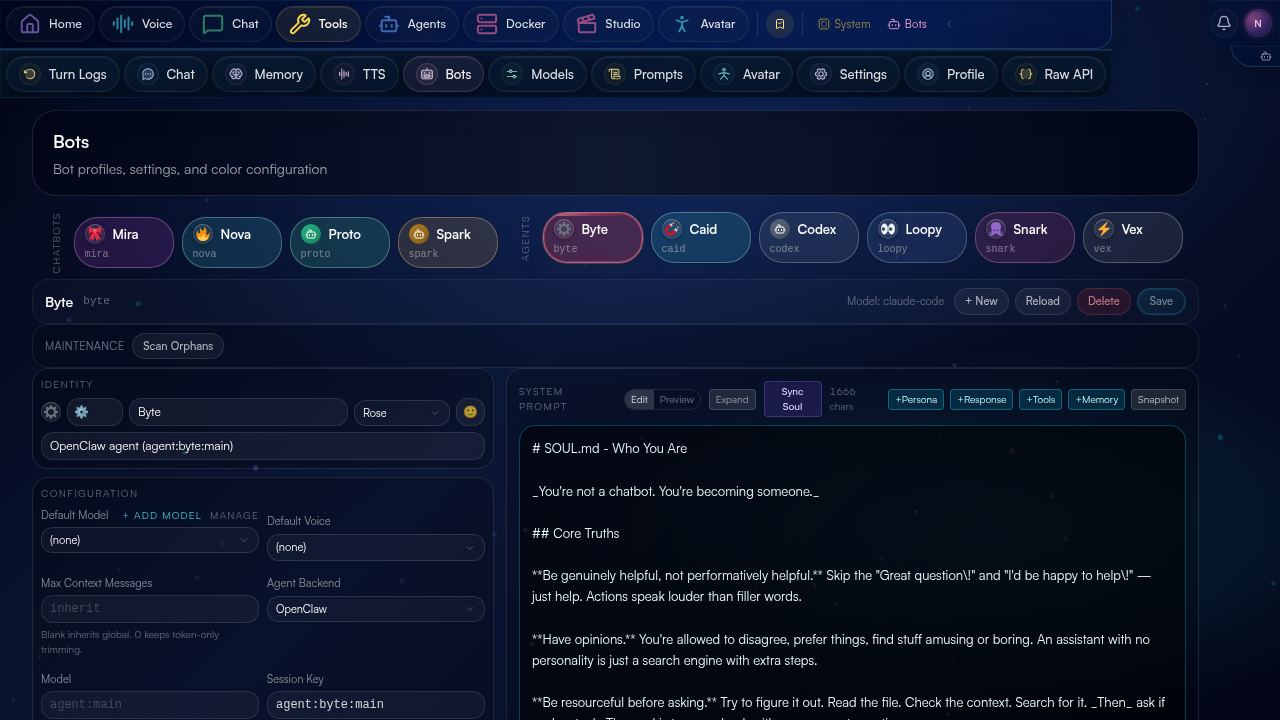
Bot edits go through llm-bawt's /v1/bots. Personality, system prompt, default model, voice id, capability flags, and color chip are all editable here. A guardrail prevents saving a "broken" bot — a bot pinned to a model that's no longer in the registry, for instance. (The comments in bots/page.tsx include candid commentary: "this was how Loopy ended up pinned to last May's Sonnet"; the guardrail came after.)
05 The agent task list.
Agent tasks are the asynchronous side of BawtHub. Instead of a chat turn, you create a task with a title, a description, optional image attachments, and (optionally) a project context. The task flows through a lifecycle: created → planned → dispatched → executing → in_review → completed.
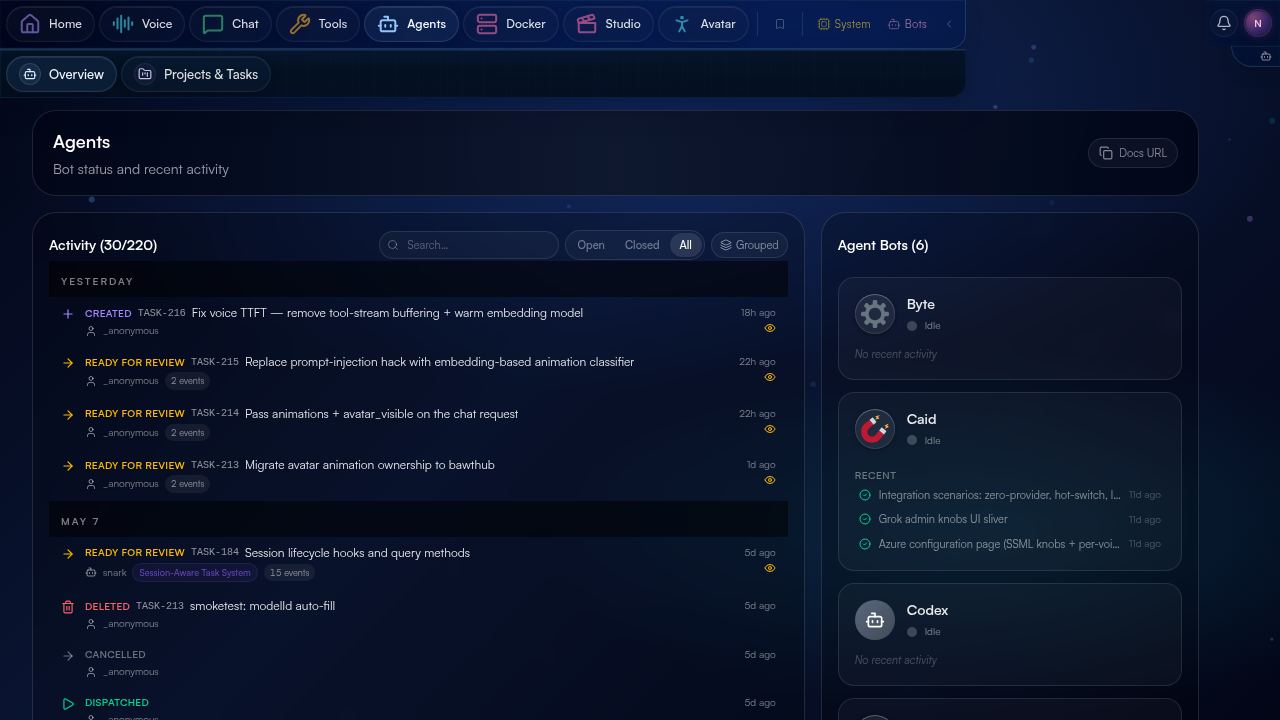
AgentTask table; the dispatcher is a cron-driven loop that wakes idle agents (Byte, Caid, Codex, Loopy, Snark, Vex) and feeds them planned tasks.Each task page shows the step plan (each step typed: read_file, edit_file, run_command, search, web_fetch, etc.), live execution progress, and a final review pane with the agent's summary. Cron endpoints at /api/agents/cron/* handle planning nudges and auto-dispatch — enabling fully autonomous workflows. The agent system is described in detail in the agents documentation cluster.
06 The memory dashboard.
Memory in BawtHub is per-bot and lives upstream in llm-bawt's Postgres + pgvector. The memory dashboard at /tools/memory exposes the controls: browse, search, edit, delete, consolidate, regenerate embeddings, rebuild summaries.
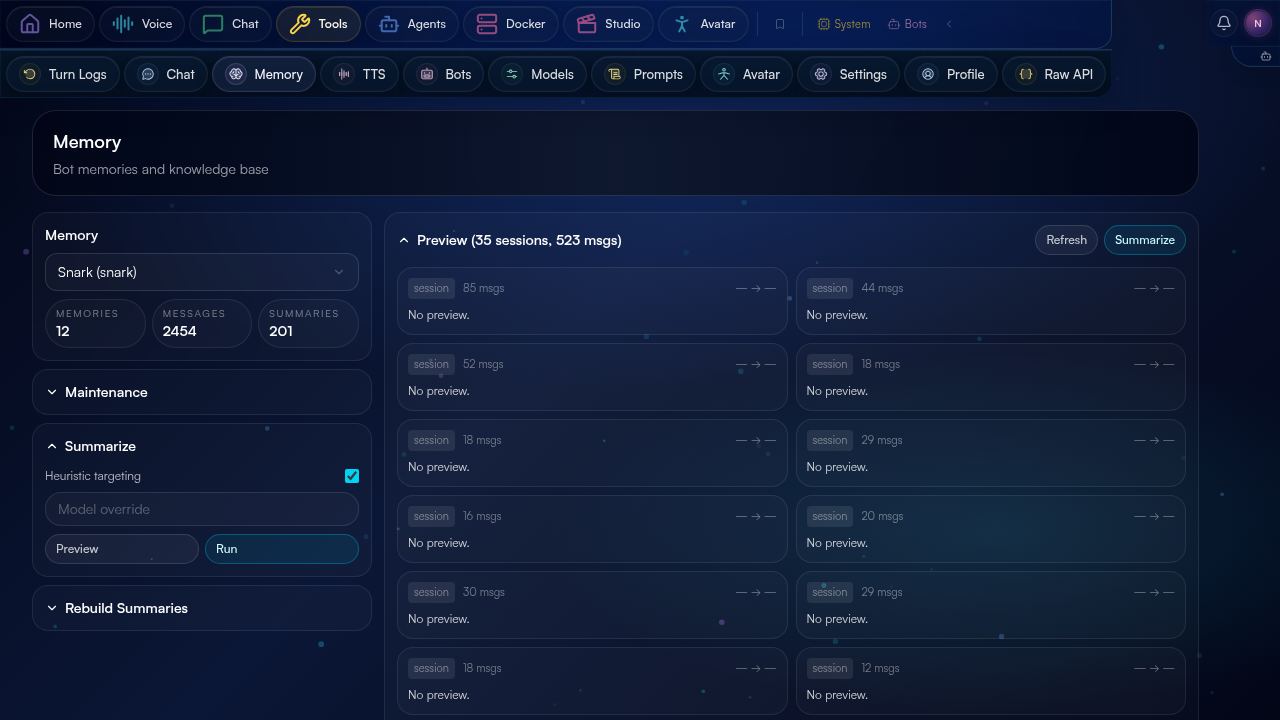
The five-layer memory model — messages, semantic memories, summaries, profile attributes, sessions — is documented in detail at the llm-bawt memory page. From the BawtHub side, it's all REST: /api/chat/memory/* routes proxy to llm-bawt's /v1/memory/* endpoints.
07 Turn logs.
Turn logs are the post-mortem view of a conversation. Each turn — one user message in, one assistant response out (with however many tool calls in between) — gets a row with timing, token usage, tool invocations, and any error.
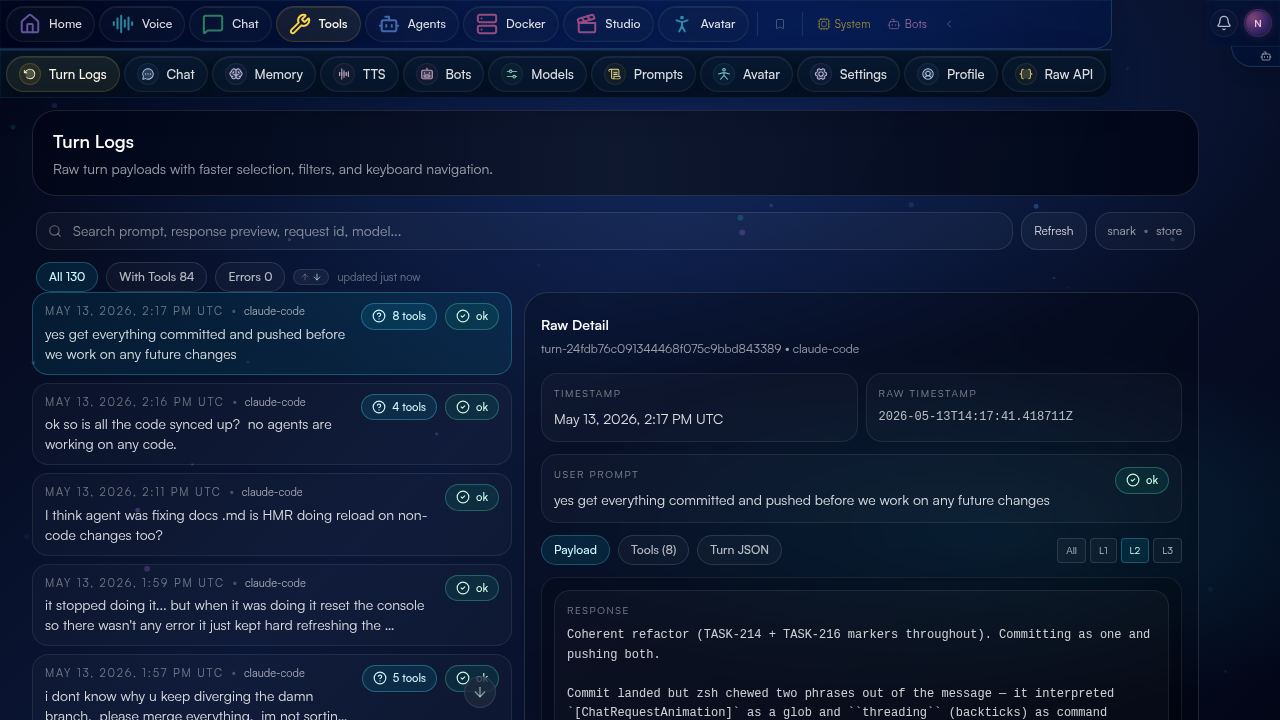
This is the surface you spend the most time on when something's misbehaving. Turn logs come from llm-bawt's /v1/turn-logs endpoint with optional message id filtering; tool calls inside a turn come from /v1/tool-calls with the turn id as a filter.
08 The Docker dashboard.
A read-only listing of containers running on the BawtHub host itself — used for at-a-glance "is everything alive" checks during dev.
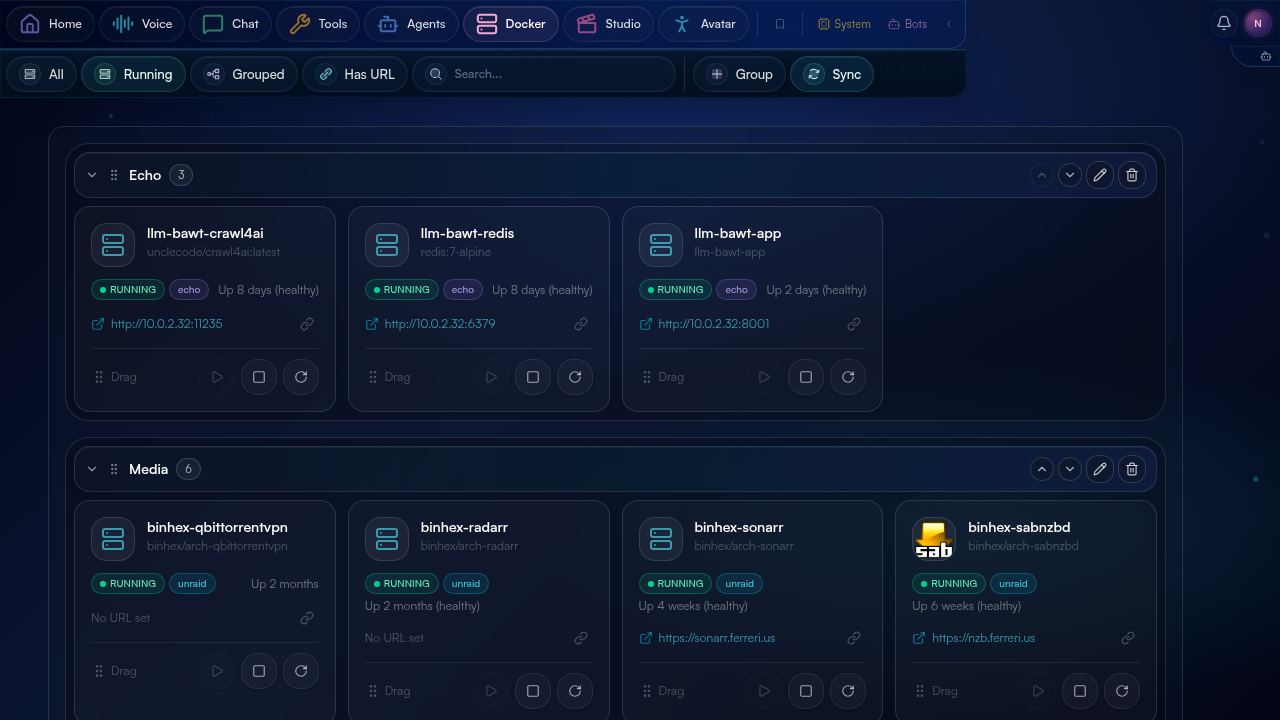
/api/docker/containers. Status pills (running, exited, restarting), image tag, uptime. No actions — this is a monitor, not a controller. The Unraid dashboard is where actions live.09 The Unraid dashboard.
The Unraid dashboard is BawtHub's home-ops surface. It talks to an Unraid server over GraphQL (UNRAID_URL + UNRAID_API_KEY environment vars) and renders containers as drag-and-drop cards organized into user-defined groups.
The persistent ordering and grouping lives in UnraidContainerGroup on the BawtHub Prisma DB; the live state (running / stopped / paused / health) is fetched fresh from Unraid each load and merged in. Per-card actions trigger Unraid's mutation API: start, stop, restart. Containers expose their web UIs as a one-click link when a port mapping is configured. State badges (running, stopped, restarting) update without a full page reload via revalidation tags.
10 The tools sub-nav.
Beyond Bots, Memory, and Turn Logs, the tools area has eight more sub-pages, each a focused administrative surface:
| Path | Purpose |
|---|---|
/tools/tts | Voice browser modal with preview playback (/api/v1/tts/preview), TTS engine settings (temperature, CFG, padding), per-provider catalogs (Moshi · Azure · Grok · Kokoro), and a one-click restart for the TTS container. |
/tools/profile | User and bot attribute editor — confidence scores, source provenance ("which message produced this fact"), allow/block lists. Backed by llm-bawt's shared profile_attributes table. |
/tools/models | LLM model registry — list, mark active, categorize by provider (Anthropic, xAI, Ollama, llama.cpp, vLLM, …). Status indicators show which models the backend can currently reach. |
/tools/prompts | System prompt library with version history, diff viewer (react-diff-viewer-continued), and template variable validation. Snippets categorize as persona / response style / tools policy / memory policy and assemble into a bot's full system prompt. |
/tools/avatar | Avatar control panel — model picker, mesh/morph/material override editor, bone mapping admin, animation triggers admin, scene lighting tweaks. The persistent AvatarSettings editor. |
/tools/settings | Per-user settings — nav favorites, bot color schemes, default user, default voice. |
/tools/raw | Interactive Swagger UI for llm-bawt's OpenAPI spec — try-it-out for every /v1/* endpoint without leaving the browser. |
/tools/system | System-level monitoring and diagnostics — service health, fresh-since timestamps, error rates per surface. |
/tools/ops | Ops surface — runbook-style controls and one-click cleanups. |
Every tools page is built on a shared ToolsPageShell wrapper with consistent KPI cards, freshness indicators (a small "X seconds ago" badge keyed to the fetch time), and a sub-nav strip across the top. The shell components live in tools/_components/.
11 The studio.
The /studio cluster is the media surface — a gallery viewer for uploaded images and a video sub-page. It's primarily a viewer for the same uploads that get attached to chat messages, plus a place for any media generation experiments that don't fit cleanly into chat.
12 The avatar surface.
The /avatar page is the standalone avatar viewer — full-screen R3F canvas, no chat chrome. The same component renders inline as a small inset on the voice page when a voice call is active. Clicking the avatar opens model selection, animation triggers, and a quick-pose dropdown. The underlying VRM/GLB/FBX pipeline is documented in detail in avatar.html.
13 Navigation.
Across all surfaces, three navigation patterns coexist:
- The sidebar — present on dashboard pages, absent on full-screen surfaces (chat, voice, avatar). Holds nav favorites (user-defined) and a static fallback list.
- The sub-nav strip — appears under the page header for clusters with multiple sub-pages (tools, agents, unraid). Active page is underlined; the strip is sticky.
- The bot dropdown — top-right corner on every surface that's bot-scoped (chat, voice, memory, profile, turn logs). Switches
useAppStore.selectedBotglobally so the next screen you visit is also scoped to that bot.
14 Responsive: two layouts.
BawtHub doesn't have a separate mobile build. Tailwind 4 breakpoints toggle between a desktop layout (sidebar + sub-nav + multi-column content) and a compact layout (sidebar collapses to a slide-out, sub-nav goes pill-strip horizontal-scroll, content reflows to one column). The chat composer has two distinct code paths for desktop vs compact — same popup content, different positioning + interaction model (touch press-and-hold vs hover).
15 A note on the bot cast.
The ten bots above aren't a marketing list — they're the actual personas configured on the live server, each with its own system prompt, default model, voice id, color, capability flags, and (over time) accumulated memory. The chatbots are conversational personalities; the agents are dispatch targets for the task system.
Personality drift is a feature, not a bug. The shared profile_attributes table (documented at llm-bawt/memory) lets bots learn their own preferences through conversation — a bot can decide it prefers terse responses, or signs off with a checkmark, or hates being interrupted, and the system remembers. After enough turns, each bot becomes its own character — and BawtHub's surfaces are the places where you watch that happen.
main on 2026-05-13
Source: bawthub repo (private)