One render engine.
Every tool call.
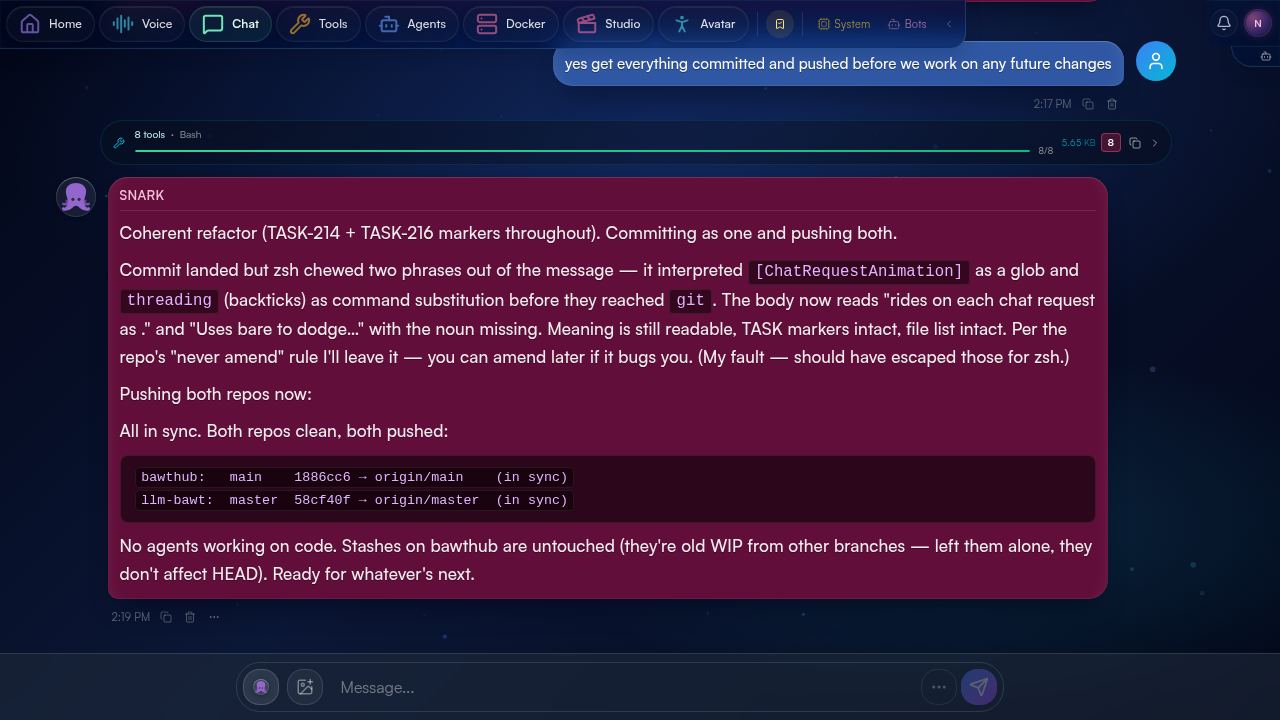
The chat surface is the dense, visible output of everything underneath. Every backend — the native tool loop, Claude Code, Codex, OpenClaw — emits tool events into a single stream, and the chat renders them through one shared component tree. Diffs. Parsed commands. SSH targets. MCP pills. Streaming partials. All shaped to be skimmable, foldable, and beautiful.
01 Why this surface exists.
You're talking to a bot that's running real commands on real machines. It's editing files on your home server, SSH-ing into a NAS, hitting your memory store, talking to other bots. The interesting question isn't "what did the bot say?" — it's "what did the bot just do?"
The chat surface answers that. Every action the bot takes shows up as its own component — what kind, what target, what came back, with what status. You can scan a long thread and read it like a captain's log: prose where it's prose, command where it's a command, diff where it's a diff. Nothing is hidden in a "tool call" greybox you have to click to understand.
Errors flip the status dot red and surface the exit code in the headline. SSH calls show the host as a coloured pill so you know which machine. Edits show the actual diff. Long file reads collapse to a head-of-file slice. None of these are special cases — they're the same component, configured per kind.
02 One renderer, every backend.
Behind the scenes, four different things might be running the bot's turn: the native tool loop, the Claude Code SDK, the Codex SDK, or the OpenClaw gateway on a remote host. Each of them speaks its own protocol and emits its own event shape. The chat surface normalises all of them into a single stream of typed events, then renders that stream through one component tree.
You don't see this in the UI — that's the point. A bash call from Loopy on Claude Code looks identical to a bash call from Caid on Codex looks identical to a bash call from Snark on OpenClaw. The visual treatment, the folding behaviour, the status colours, the parsed host pill — all the same. Only the bot's avatar tells you which one ran it.
core/tool_loop.pySDK subprocesschatgpt OAuthWS framesevent.kindAdding a new agent backend doesn't touch the chat code. Adding a new tool kind is a single renderer in one file. The contract — "emit an AgentEvent on the wire and the chat will render it" — is the only thing every backend has to honor.
03 What you see, by tool kind.
Every tool gets the same skeleton — a status dot, a coloured kind pill, a headline summarising what it did, a size, and a chevron to fold the body. The pill colour and body treatment are what change between kinds. Bash is green; Edit is gold; Read is cyan; Search is violet; SSH is orange; MCP is magenta. After a few minutes you read them by colour without thinking.
| Kind | Pill | Headline shows | Body |
|---|---|---|---|
| Bash | Bash | Bolded binary + dimmed args; pipes collapsed | Black terminal-themed block; $ prompt + output |
| Edit | Edit | File path + size delta (+8 −3) |
Unified diff with add/rm/context line markers and the real hunk header |
| Read | Read | File path + line count | Mono body with head-of-file slice; long files get an ellipsis-and-tail |
| Grep / Search | Search | Pattern + scope path + match count | Match list with file:line prefixes |
| SSH | SSH | Host pill + → + the command actually run there |
Whatever the inner command produced (often terminal) |
| MCP | MCP | Magenta pill with the namespaced tool name + dimmed args | Structured result; bolds, spans, and the tool's native shape |
The status dot in the head has three states with distinct colours: ✓ ok, ● running (pulses), ! error (with the exit code shoved into the size slot). Errors never collapse — they default open.
04 Parsed commands.
Every bash and ssh call gets parsed at render time, not just dumped as a string. The renderer pulls out:
- Host for SSH calls — rendered as a coloured pill (
echo,unraid-lan) so the target is the first thing you see - Command name (the binary) — bolded
- Args — dimmed mono
- Pipes — collapsed into one line if the chain is short, expanded inline if long
- Heredocs — folded into the body, not the headline
This is the difference between reading "this command ran" and understanding what the command did at a glance. When a turn has fifteen tool calls, that difference is the whole experience.
05 The MCP pill.
Tools that come in via the MCP server get a distinctive rendering — a magenta pill (⌬ memory_search) with the full namespaced tool name, the args inline and dimmed, and the result body collapsible. This is how bots use cross-cutting capabilities like memory, task management, or messaging other bots. The pill makes "this is an MCP tool, not a local command" instantly obvious in a long thread.
The renderer for kind: "mcp" doesn't try to be smart about the body — it shows the JSON-ish result the server returned, formatted as monospace, and lets the human's eye do the parsing. Bots themselves are usually the consumers; the human just wants to scan whether the lookup worked.
06 Grouping & collapse.
Some turns produce a dozen tool calls in a row — searches, file reads, edits. Showing them all expanded would bury the conversation. The chat applies a heuristic: if a single message has more than 3 sequential tool calls of similar kinds, they collapse under a summary header.
The grouped view shows the count and a one-line summary the renderer composes from the kinds — "Read 7 files, ran 4 searches, executed 1 grep" — so the human can decide whether to expand. Inside the group, each tool call is collapsed by default. Click any individual chevron to drill in.
07 Streaming, not batching.
Tool calls show up as they happen. A bash command in flight has a pulsing yellow dot and the word streaming… where the size will eventually be. The dot flips to green and the size resolves the moment the command finishes. Long file reads fill in line-by-line, terminal-style. You're watching the bot work, not waiting for it to finish.
Reload the page mid-turn and the in-flight tool call is still there — events are written to two channels (a per-request stream tied to the HTTP request, and a persistent per-bot stream the page resubscribes to on load). You don't lose progress to a refresh. The streaming events page covers the mechanics; the user-facing effect is just "reloads don't break things".
08 Carries across surfaces.
The chat is one of three places you can talk to a bot. Voice (the orb) and the CLI (llm -b loopy …) both speak to the same session, the same memory, the same tool history. Open the chat after a voice conversation and the transcript is already there — same thread, same bot, same tool calls rendered the same way they would have if you'd been on chat the whole time.
This is what makes the tool-call rendering matter beyond aesthetics: the chat is the archive. Whatever the bot did over voice or from the command line gets a permanent rendered home there. You can come back to it weeks later and see exactly what happened.
09 Why this matters.
Most chat surfaces with tool support treat tool calls as noise — they collapse them, dim them, gray them out. They're treated as boilerplate between the human and the model.
BawtHub treats them as the point. When a bot does work for you, the doing is what you want to see — what it ran, what came back, what changed. The chat surface is engineered as much for tool readability as for prose readability. Both are first-class.
"How agent tool calls are mapped into a common rendering engine for doing edits, seeing the changes with diffs, parsed commandlines and ssh."
This page is that. Every detail above — kinds, statuses, parsed hosts, diffs, the MCP pill, grouping, streaming dots — is a direct artifact of treating "the agent did something useful" as a UX problem worth solving end-to-end, not as a developer convenience.
For the underlying mechanics — how events get from each backend to the chat, how the per-bot streams stay alive across reloads, where the design vocabulary lives in code — see streaming events and agent backends.
main on 2026-05-13
Source: bawthub repo (private)